


ZSK TERMINAL · Embroidery software for job preparation and production planning
Prepare embroidery files on screen. Reduce data entry at the machine.
ZSK TERMINAL prepares existing embroidery files for your ZSK embroidery machines. Depending on the edition, it also provides hoop checking, colour matching, job costing and production planning.
Optimised workflows · Digital processes for embroidery businesses · Made in Germany
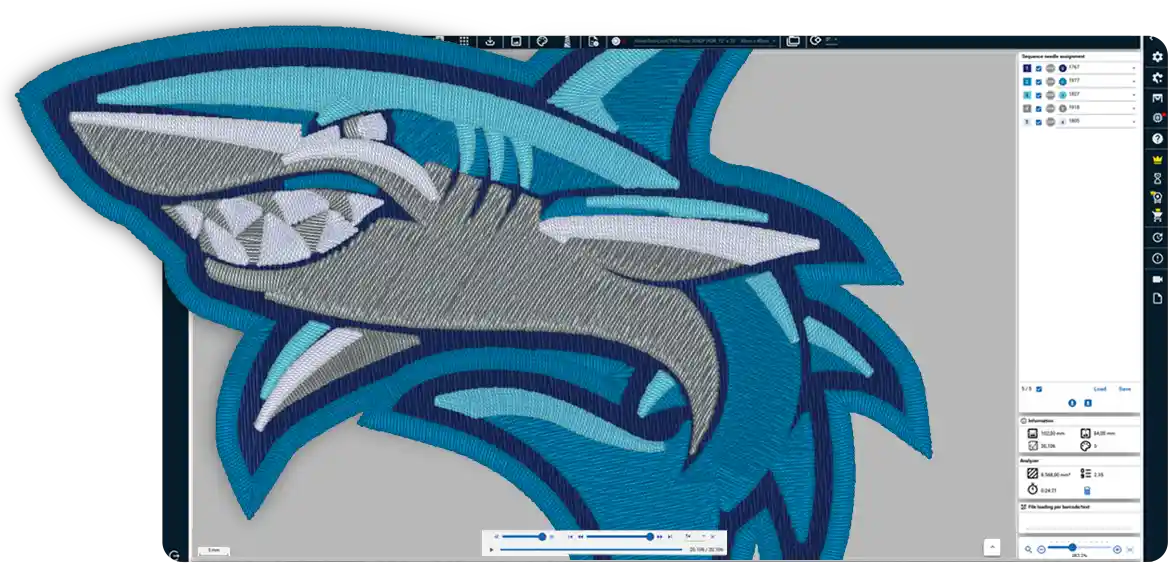
43
embroidery file formats
17
interface languages
4
progressive editions
5
active machines included in planning
Overview
Embroidery software for the journey from file to machine
TERMINAL works with ready-made embroidery files – your own or supplied by customers – prepares them and transfers them to the machine.
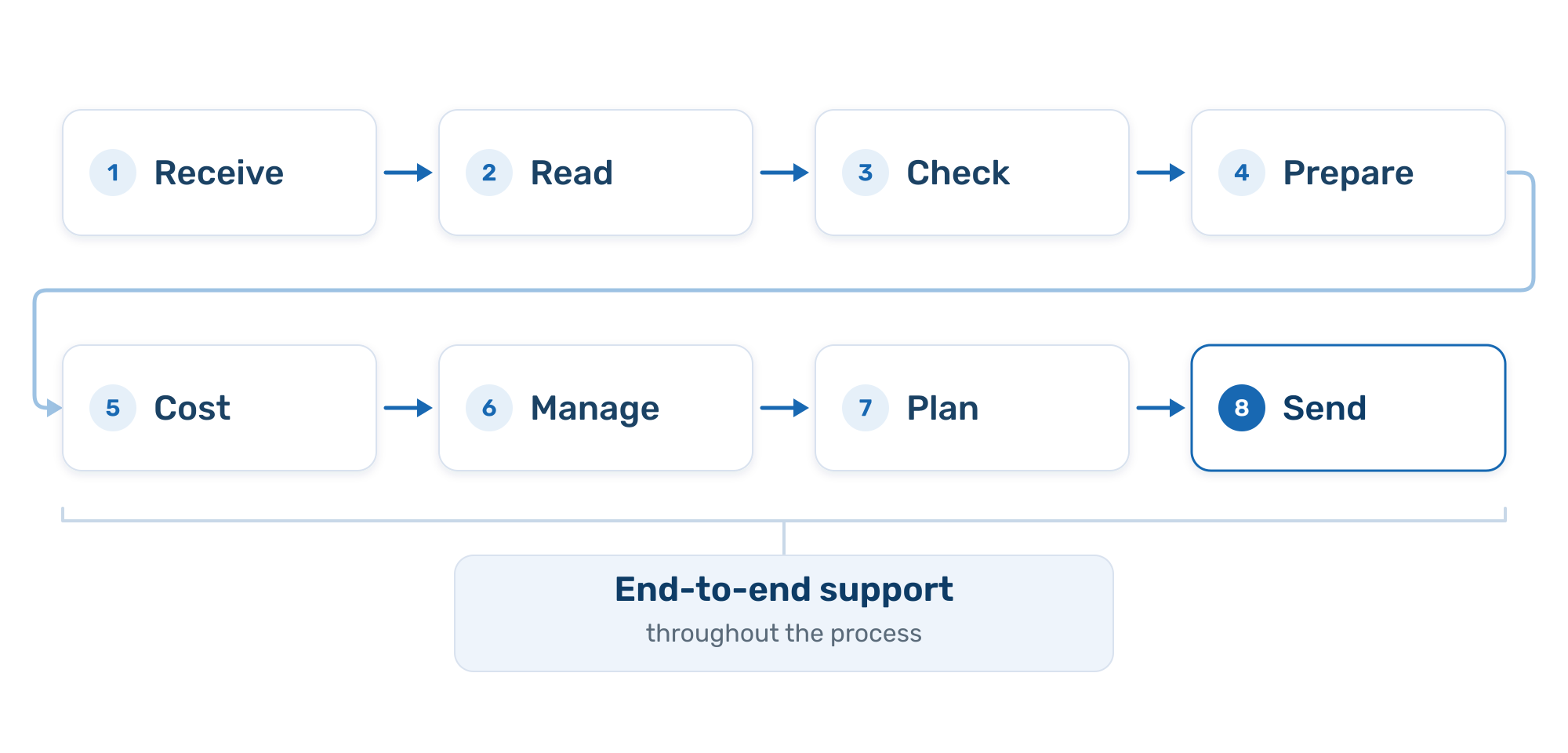
Every order follows the same process: it arrives, is read and checked, prepared and costed, managed, planned and sent to the machine. TERMINAL supports it throughout this process.
TERMINAL is not digitising software and cannot be used to digitise designs; EPCwin and BasePac are available for this purpose.
The exceptions are lettering and photographic motifs, which TERMINAL can generate itself.
Why TERMINAL
Where every order can lose money.
Your margin is determined not only by embroidery time, but also by everything that happens before and around it. These are the three areas where costs most often arise in practice.
Job costing
The price is based on instinct rather than the file
–
Without TERMINALThe price is based on experience. Only a post-calculation shows whether the order achieved its margin – if one is carried out at all.
✓
With TERMINALAnalyzer reads the stitch count, running time and thread consumption from the finished embroidery file. The price is established before the quotation is sent.
An order priced too tightly consumes the margin on the next one – continuously and unnoticed.
Set-up
You only discover at the machine that the hoop does not fit
–
Without TERMINALThe machine is already idle when you discover that the design does not fit the hoop. The design is sent back and the order slips down the production schedule.
✓
With TERMINALHoop management checks this on screen before set-up – not at the machine.
In practice, this often means 20 to 40 minutes of downtime per incident, plus rescheduling.
File transfer
You cannot tell which version is on the USB drive
–
Without TERMINALThe file is taken to the machine on a USB drive, and colours and needles are entered manually at the control. An error may only become apparent after embroidery.
✓
With TERMINALThe design is sent to the machine over the network. Colours, stops and hoop details are stored in the file – there is nothing to re-enter.
A production error costs more than time: it also puts material and the delivery date at risk.
The same order, two different workflows
The steps do not disappear; they move into the software. What matters is how many of them a person still has to perform manually.
Without TERMINAL
7 manual steps · approx. 45 mins
1
The order arrives and is entered in a list.
5 mins
2
The customer file is in a format that requires a separate tool.
5 mins
3
Whether the design fits the hoop only becomes clear during set-up.
10 mins
4
The price is based on experience.
10 mins
5
The file is taken to the machine on a USB drive.
5 mins
6
Colours and needles are entered at the control.
8 mins
7
The status of an order has to be checked by asking someone.
5 mins
With TERMINAL
2 manual steps · approx. 5 mins
1
Open the file in the project.
2 mins
2
Send the checked design to the machine.
3 mins
✓
TERMINAL handles everything in between
- Read file formats
- Check the hoop
- Calculate the price
- Transfer over the network
- Assign colours & stops
- Provide the planning overview
Six steps that no longer require manual intervention – and where nothing can be lost in the handover.
5 of 7
manual steps eliminated
approx. 40 mins
less manual work per order
approx. 13 hours
per week for 20 orders
The machine does not embroider any faster. This is working time that was previously lost between process steps.
Times are practical estimates, not guaranteed performance figures. Actual results depend on the order mix, file formats and machine fleet.
From the Free edition, TERMINAL reads common formats and sends designs to the machine. Studio adds the remaining formats, batch processing, hoop checking and job costing; Factory adds projects and the planning overview. The module table below shows which functions are included in each edition.
How TERMINAL changes your workflow
Four improvements you will notice.
Know the price before you commit.
Calculate the job directly from the finished embroidery file using your own rates.
Check hoops and colours before set-up.
See on screen whether the design fits the hoop and which thread cone carries each colour.
Everyone can see the order status.
The schedule, production queue and maintenance records are available to the whole team, not just the person who created them.
See it working with your own files.
The software comes from the manufacturer of your machine – and our specialists understand both.
Exclusive to TERMINAL – T8 software updates
Your ZSK embroidery machine keeps getting better
The T8 control software is continually being developed. Free updates add new functions and improvements to your ZSK embroidery machines.
Your business benefits through new product opportunities, more efficient workflows, higher embroidery speeds, stronger margins and greater profitability.
In future, T8 software updates will be displayed exclusively in TERMINAL and can be accessed there. The Free edition is all you need: register once and you will be notified of every enhancement without having to search for it.
Receive and prepare files
Open, check and cost customer embroidery files
A customer sends a file in a format you cannot open. You estimate whether the design will fit the hoop, assign the thread cones one by one and price the job from experience. Any problem may only become apparent at the machine.
With TERMINAL Studio, you can open the file, check the design in the hoop, match its colours to your thread cones automatically and produce a PDF quotation – all before the machine is set up.
€0Free
Free to use permanently – not a trial
Simply register once. The free feature set lets you supply one ZSK embroidery machine with designs at no additional cost.
- Read and convert common formats: TC/Z00, DST, DSZ, PES, TBF and PAT
- Manage designs with categories, search, date filters and thumbnail previews, so colleagues can find designs they did not create themselves
- Create lettering from installed fonts, turning personalised names into a simple text entry rather than a separate digitising job
- Turn photographs into embroidery designs with up to 24 colours and traced contours
- Print labels and job sheets
- Set up your machine fleet once as the basis for assignment, planning and colour matching
€49/ month · Studio
For incoming customer files
For preparing embroidery designs – and for businesses that need reliable, transparent job costing.
- Work with 43 formats instead of six, process entire folders in one pass and export to DST and PES
- Preview jumps, trims and colour changes along the actual needle path
- Manage hoop dimensions and check that the design fits before machine set-up
- Define start and end points, including during batch conversion
- Match design colours to thread cones automatically using LAB colour distance or your own cross-reference table
- Cost the job from the finished embroidery file using your own rates, and issue quotations as PDF or XLSX files
Embroidery file formats supported by TERMINAL
Included in Free
TC/Z00 DST DSZ PES TBF PAT
From Studio – 43 formats in total, including
EXP JEF PEC PCS VP3 HUS U01 SEW XXX TAP DSB EMD GT
Looking for a format that is not listed here? Ask us about it: software@zsk.de
Manage and document production
Production planning across your machine fleet
A customer asks about an order. A machine breaks down. A second workstation needs access, or maintenance work must be documented. At moments like these, your team needs to know exactly what is running and whether a promised delivery date is realistic.
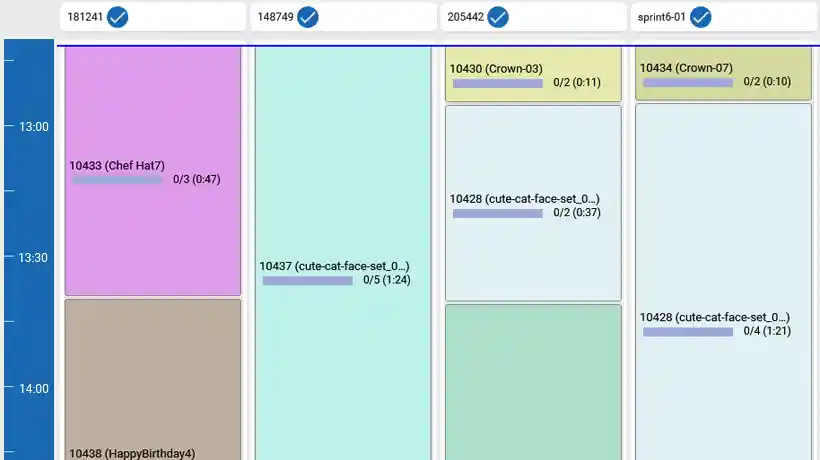
With TERMINAL Factory and the ZSK PoolBox, the schedule is available on every screen, each machine reports its progress and maintenance records include named sign-offs. The deciding factor is not the number of machines, but whether anyone else needs a clear view of current production.
Factory
Production planning across the machine fleet, a queue for each machine, signed maintenance records, projects containing every order file and one shared status across all workstations.
Technology
The edition for technical embroidery. Its current module set is identical to Factory; functions for technical applications will be added to this edition in future releases.
Three questions determine the right set-up.
1
Is your machine networked?
TERMINAL also works without a network, using a USB drive or an output folder. ZSK AirBroidery lets you send and manage embroidery files wirelessly at the machine. ZSK PoolBox connects multiple machines to TERMINAL and, with the appropriate module, provides live production feedback.
2
How many workstations need the same live status?
PoolBox comes into play as soon as more than one workstation is involved or the planning overview needs to be displayed on screens in the production area.
3
How large is your machine fleet?
Planning for five active machines is included. Two add-on packages extend ProductionPlanner beyond that.
Only you know the answers. A short conversation is enough for us to identify the edition that best suits your business.
Your ZSK software and connectivity options
Choose the right tool for each task.
These products complement one another by function rather than by sequence. What you need depends on what you want to achieve.
TERMINAL
Receive, check, prepare and cost files, then send them to the machine. The Free edition remains available permanently.
PoolBox and AirBroidery
ZSK AirBroidery lets you send and manage embroidery files wirelessly at the machine. ZSK PoolBox connects multiple machines to TERMINAL and, with PoolBoxConnect, provides live production feedback.
MY.ZSK
Machine data, service information and spare parts in one place.
The four editions
Find the edition that suits your business.
Each edition builds on the one below and includes all of its features. All prices are shown here; paid editions can be cancelled monthly and tried for 30 days. The table below shows which modules are included.
Free
free
For every ZSK embroidery machine: manage designs, send them to the machine and receive the latest T8 updates.
Free to use permanently
Studio
€49 / month
Know before set-up whether the design fits the hoop, whether the thread colours match and what the embroidery job will cost.
Factory
€129 / month
See which order is running on each machine and which machine will become available next.
Technology
€199 / month
For technical embroidery applications – TFP, smart textiles and composites.
Larger machine fleet? Add-on packages extend your planning capacity: ProductionPlanner Pro supports up to 20 machines for €500 per month, while Enterprise supports up to 50 machines for €1,000 per month.
Modules included in each edition
The edition shown is the first to include the module.
| Module | From edition | What it does |
|---|---|---|
| Converter | Free | Reads and converts embroidery files and provides a design preview. |
| DesignStock | Free | Manages designs with categories, search, date filters and thumbnails, and prints labels and job sheets. |
| EasyText | Free | Creates lettering from installed fonts and positions it within a hoop or at a defined distance from a design. |
| PhotoStitch | Free | Turns photographs into embroidery designs with up to 24 colours and traced contours. |
| Hoops | Studio | Manages hoop dimensions, provides a hoop preview and checks whether the design fits. |
| Analyzer | Studio | Costs a job from the finished embroidery file using your own rates and creates quotations as XLSX or PDF files. |
| AdvancedImport | Studio | Adds 37 import formats beyond those included in Free. |
| AdvancedExport | Studio | Exports to DST and PES as well as .z00, defines start and end points during export, and adds markers to previews and job sheets. |
| ConverterPlus | Studio | Adds an enhanced preview with grid, scale, coordinates, paths, trims and thread rendering, plus batch conversion of entire folders. |
| AdvancedColorMatching | Studio | Matches colours automatically using LAB colour distance or a cross-reference table, and enables thread catalogue selection in PhotoStitch. |
| Projects | Factory | Groups all files for an order into one project, with comments for each file. |
| MachineMatching | Factory | Provides a queue for each machine, checks files on import, supports barcode assignment and selects heads for parallel items. |
| Maintenance | Factory | Records maintenance intervals, appointments and named sign-offs, supports retrospective entries and exports to XLSX, CSV or JSON. |
| PoolBoxConnect | Factory | Connects live to the PoolBox server, provides one shared status across all workstations and receives feedback from the machine. |
| ProductionPlanner | Factory | Plans work across the machine fleet, assigns jobs automatically by capacity, hoop type and thread cones, and provides a planning overview with remaining times and shifts. |
Good to know
Other practical considerations.
Offline operation
Licences are purchased or renewed online through the ZSK License Hub. For production networks without direct internet access, the licence can then be transferred to TERMINAL using a time-limited activation file. Without an internet connection, however, TERMINAL cannot check automatically for application and T8 updates.
Multilingual
The interface is available in 17 languages, with right-to-left layouts for Arabic and Hebrew. You can change language without restarting the application. TERMINAL also supports touch operation on a panel PC on the shop floor.
Included from the Free edition
Frequently asked questions
What customers ask before downloading
What is ZSK TERMINAL?
ZSK TERMINAL is production software from ZSK, the Krefeld-based embroidery machine manufacturer. It opens and checks embroidery files, costs jobs, plans production and sends designs to ZSK embroidery machines. Digitising is carried out in EPCwin or BasePac; TERMINAL works with finished embroidery files.
Can TERMINAL convert PES to DST?
Yes, with the Studio edition. TERMINAL can read PES from the Free edition onwards; export to DST and PES is part of the AdvancedExport module included in Studio. TERMINAL reads 43 embroidery file formats in total. Six – TC/Z00, DST, DSZ, PES, TBF and PAT – are included in Free. Studio adds the remaining 37 formats and batch conversion of entire folders.
Does TERMINAL work with embroidery machines from other manufacturers?
For files, yes; for direct machine connectivity, no. TERMINAL opens and converts embroidery files regardless of the machine manufacturer and exports them as DST or PES. Network transfer, production feedback and firmware notifications are designed for ZSK embroidery machines.
How much does ZSK TERMINAL cost?
The Free edition is free to use permanently after a one-off registration in the ZSK License Hub. Studio costs €49 per month, Factory €129 and Technology €199. All three can be tried for 30 days. For planning more than five machines, ProductionPlanner Pro supports up to 20 machines for €500 per month, while Enterprise supports up to 50 machines for €1,000 per month.
Does TERMINAL require an internet connection?
No. TERMINAL can also be operated on production networks without direct internet access. Licences are purchased and renewed online in the ZSK License Hub, then transferred to TERMINAL using a time-limited activation file. When it expires, a new activation file must be generated online and imported. Without an internet connection, TERMINAL cannot check automatically for application and T8 updates.
What is the difference between TERMINAL and EPCwin?
EPCwin and BasePac are digitising applications used to create an embroidery design from artwork. TERMINAL works with finished embroidery files: it opens, checks, prepares and costs them, plans production and sends them to the machine. The only exceptions are lettering and photographic motifs, which TERMINAL can generate itself.
How many machines can I plan with TERMINAL?
The Factory edition includes planning for five active machines. Two add-on packages extend ProductionPlanner beyond that: Pro supports up to 20 machines and Enterprise up to 50.
Can I digitise designs with TERMINAL?
No. EPCwin and BasePac are available for digitising. TERMINAL can, however, generate lettering from installed fonts and turn photographic motifs into embroidery designs with up to 24 colours.
Information correct as at October 2026 · ZSK Stickmaschinen GmbH, Krefeld
Technical information & documentation
System requirements and user guide
Everything you need to install ZSK TERMINAL and get started.
System requirements
- Operating system: 64-bit (x64) Windows 10 or Windows 11
- Memory: at least 8 GB RAM
- Free storage: at least 1 GB for the application, plus storage for your embroidery designs
- Screen resolution: 1,920 × 1,080 pixels recommended
- Installation and updates: administrator rights required
- Licensing: licences are purchased and renewed online, then can be transferred to production networks without direct internet access
The required .NET runtime package is supplied with the installer.
TERMINAL user guide
The user guide takes you from your first steps through to advanced workflows and production planning.
English
PDF · 25 pages
Download
Download the software and get started.
Install TERMINAL and begin working with your own files straight away.
Get started straight away
Enter your email address in the ZSK License Hub and you will receive the download link and licence key by email. The Free edition remains available permanently.
One-off registration
Free to use permanently
Try it with your own files
Use the full feature set for 30 days. A payment method is required in the License Hub to start the trial. Locked functions remain visible afterwards and tell you which edition is required when selected.
Payment method required
€49 / month afterwards
Prefer a demonstration using your own material?
Bring a design that you cannot currently open, or can only open using a workaround, together with a typical job calculation. We will demonstrate TERMINAL using your files, not a standard demo.
✉
☎
Contact
Preview – no data is stored or sent.