



Troubleshooting & error messages for ZSK embroidery machines
Thread breaks, loops, a distorted design or a T8 message? Find your symptom, work through the checklist – and report the issue if the machine still will not run.
Report an issue – have this ready
If the machine will not run or an error keeps recurring, use the service request. The ZSK service team handles requests Monday to Friday.
- Machine number and model: on the metal type plate – front bottom left on RACER and CHALLENGER, on the back on SPRINT.
- Control unit: TFT, LCD or T8 – pictures on the service request page help.
- Error message: the exact text from the control unit.
- Photos or video: JPEG, GIF, PNG, BMP, MP4, MKV, MOV, AVI or WEBM. On embroidery photos, mark the head position relative to the design.
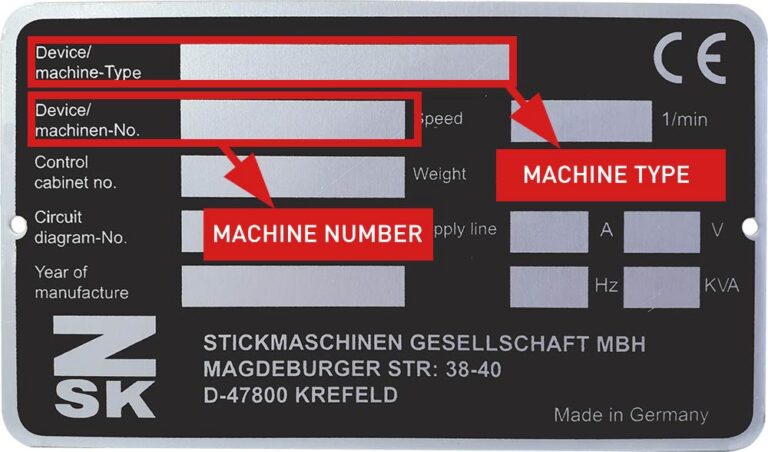
On the type plate: ZSK model and machine number.
What should you do when your embroidery machine has a problem?
Start simple: rethread, change the needle, then measure upper and bobbin tension – ZSK recommends 25–30 g for 150/180 bobbin thread. If the fault persists, check stitch density, backing and hooping. If the machine is down or shows an error message, report the issue with your machine number.
What problem are you seeing?
Each card lists causes you can check yourself and links to the detailed guides. Leave the rotary hook, needle bars and electronics to ZSK service or trained staff.
The upper thread keeps breaking
- Threading and needle: rethread and change the needle – ZSK Campus lists both among the usual causes.
- Tension: too much upper tension can break the thread – measure both tensions.
- Design: if breaks cluster on certain designs, check stitch density, e.g. with the ZSK TERMINAL Analyzer.
- Metallic thread: false alarms? Lower the needle-specific bobbin thread sensor sensitivity – some threads need 35 %.
- Multi-head: keep selective embroidery on so only the affected head repairs.
Thread break detection guide · T8 functions no. 07 and 20 (thread sensor)
Bobbin thread shows on top – or not at all
- Measure bobbin tension: for 150/180 bobbin thread ZSK recommends 25–30 g. Use the mechanical (570.632) or electronic gauge (570.800).
- Measure correctly: keep the thread in the marked deflection point; with magnetic bobbins, remove the leaf spring first.
- Bobbin thread on top: bobbin too loose or upper thread too tight.
- No bobbin thread visible: bobbin too tight or upper thread too loose.
Fabric puckers, stitches look uneven
- Target: the material stays flat and about 60 % bobbin thread shows in satin stitches.
- Upper thread by the 10/70/20 rule: about 10 % at the thread stand, 70 % at the middle tension (the main tension), 20 % at the roller tension.
- Keep the roller soft: the biggest knob, but not the main tension.
- One-Touch System: set pre-tensions 1 and 2 once to about 60–70 cN, then adjust only the roller tension with the blue ring.
- Test: when pulled, the upper thread must run evenly without jerking.
- New thread type: recheck for metallic, heavy or technical threads.
Needle problems, holes, skipped stitches
- Swap the needle: after a fabric change it may have the wrong point or size, or be worn.
- Choose correctly: system DBxK5; start with 75/11 RG, use the FFG ball point for knits and 60–65 for small lettering.
- Insert correctly: use the ZSK needle alignment aid.
- Holes despite backing: damaged or unsuitable needle, excessive density, unsuitable file or wrong tension.
- Needle breaks repeatedly: stop and report the issue. Needle/rotary hook adjustment is documented in the T8 manuals – best left to ZSK service.
Embroidery needles guide · Needle alignment aid · Needles in the shop
Design distorted or crooked
- Backing: according to ZSK Campus, the most common mistake is tear-away on knits. Stretchy fabrics need cut-away; pile fabrics also need a water-soluble topping.
- Layers: more than three layers point to a design digitised too densely.
- Hooping: hoop fabric and backing evenly; use the smallest hoop that holds the design with a margin.
- Hoops: machine-specific – arms must match brand and head spacing.
- Crooked position: the T8 Design Placement function aligns the design to two points (CHALLENGER, SPRINT 7 and the latest RACER with absolute encoders).
Loops at the start, fine details missing
- Fixing stitches: start objects with about 6 stitches of roughly 0.7 mm plus a back stitch over them; on very small objects, 0.4–0.5 mm in a small triangle.
- Design cleaning: stitch count drops on loading? Cleaning deletes short stitches – at 0.5 mm, all stitches that length or shorter. Adjust or switch it off for fine designs.
- Fine threads: needles 65 to 55 and around 700 stitches per minute.
- Knits and piqué: small lettering often sinks in; a water-soluble topping helps.
Error message on the T8, reference point not found
- Capture the message: note or photograph it; T8 function no. 03 screenshots the machine information.
- Reference points: saving and moving to them is covered by T8 function no. 34 and the manual “Defining and go to reference point”.
- Hoops and collisions: T8 functions no. 40 and 38; for CHALLENGER, the “Challenger frame limitation” manual.
- W head: the PDF “W Head – Start/End sequence” helps avoid Z-axis errors.
- Machine password: the documents “Machine password” and “Password request form” are among the T8 manuals.
- Power failure: servo-driven machines store the pantograph position and continue without offset.
Software, passwords and data transfer
- Password expired: for BasePac and EPCwin, contact your distributor or ZSK with the 5-digit dongle serial number. All EPCwin functions inactive means the password has expired.
- File formats: TERMINAL reads Z00, DST, DSZ, PAT, PES and TBF. For .dst sections and designs with more than 24 colours there is the T8 function “Virtual needles” (no. 14).
- Update the T8: T8 software is free via ZSK TERMINAL – not for SPRINT 4, TFT or LCD. Do not install software older than 19.01.2012 on T8-2/T8-3.
- Network: networking, MY.ZSK set-up, wireless and barcode loading are covered in the T8 manuals and how-tos.
Software FAQ · T8 updates · Barcode loading · Software support
More self-help
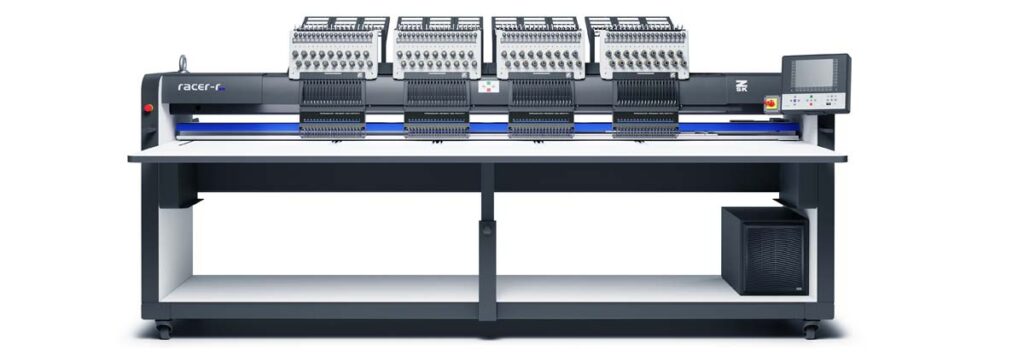
Still not solved? We are here to help.
Report the issue with machine number, error message and photos – or email service@zsk.de, software@zsk.de for software, parts@zsk.de for spare parts. Head office in Krefeld: +49 2151 4440.
Troubleshooting questions
Short answers for operators. Question not listed? ZSK service will help you personally.
Where do I find the machine number of my ZSK embroidery machine?
On the metal type plate, together with the machine type: front bottom left on RACER and CHALLENGER, on the back on SPRINT. The machine number is a required field in the service request.
What helps with frequent thread breaks?
Rethread, change the needle, then measure the tension. If breaks cluster on certain designs, check stitch density; with metallic threads, lower the bobbin thread sensor sensitivity. If it persists, report the issue.
What is the correct bobbin thread tension?
For conventional embroidery with 150/180 bobbin thread, ZSK recommends 25–30 g. Measure with a mechanical or electronic tension gauge and keep the thread in the marked deflection point. Tension is right when about 60 % bobbin thread shows in satin stitches.
Why is my embroidery distorting?
Usually backing or hooping does not suit the fabric. The most common mistake, says ZSK Campus, is tear-away on knits – stretchy fabrics need cut-away. Hoop evenly and choose a hoop that fits the design closely.
What do I do when my software password has expired?
For BasePac and EPCwin, contact your local distributor or ZSK and quote the 5-digit serial number of your dongle. Final passwords are generated once payment has been received. To keep using TERMINAL after the trial period, buy an annual licence or buy it outright with a one-off payment.
How do I get the latest T8 software?
Free of charge via ZSK TERMINAL: TERMINAL reports new T8 versions, you download the package and copy it to an empty USB stick. This does not apply to SPRINT 4, TFT or LCD; software older than 19.01.2012 must not be installed on T8-2 or T8-3.