ZSK TERMINAL · Software for embroidery businesses

Prepare embroidery files on screen. Reduce data entry at the machine.

ZSK TERMINAL prepares existing embroidery files for your ZSK embroidery machines. Depending on the edition, it also offers hoop checking, colour matching, costing and production planning.

Optimises workflows Digitalisation for embroidery businesses Made in Germany
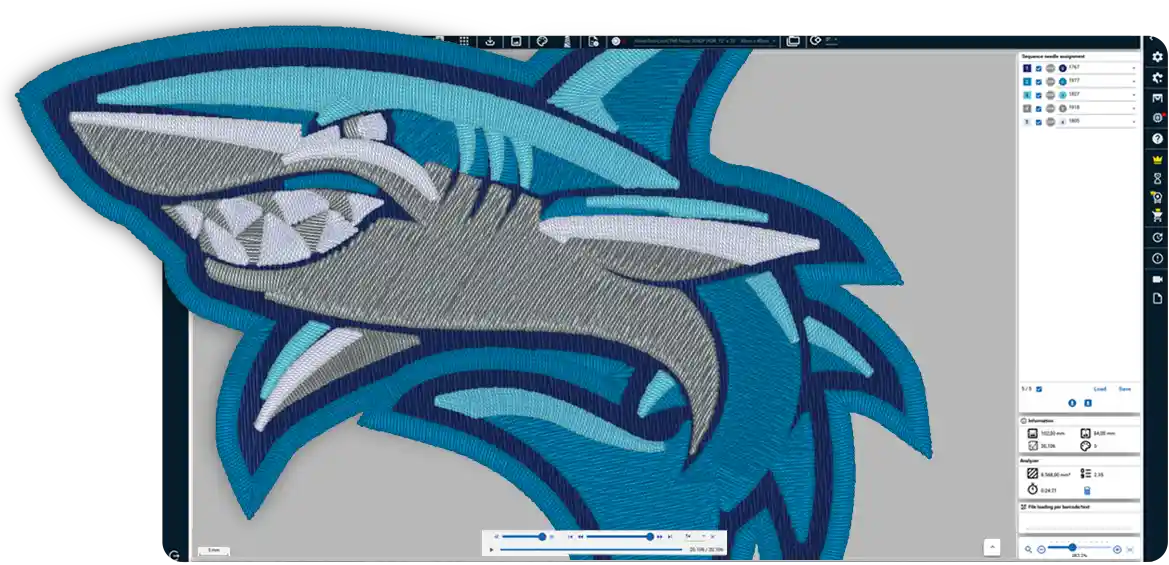
ZSK TERMINAL: embroidery design preview alongside needle assignments, design information and costing
43
embroidery file formats
17
interface languages
4
editions, each building on the last
5
active machines included in planning
Overview

Embroidery software that takes you from file to machine

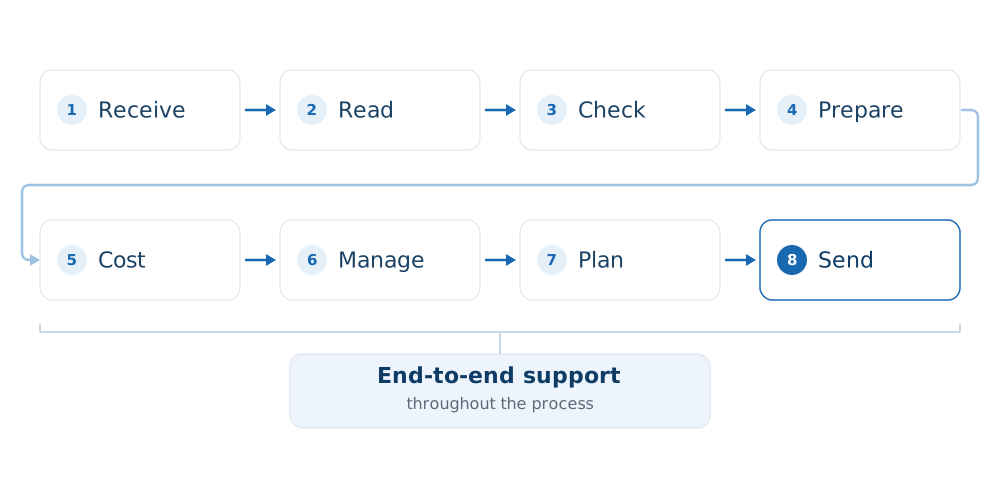
TERMINAL accepts embroidery files, prepares them and sends them to the machine – whether they are your own files or files from others, for one machine or many.

What sets TERMINAL apart from a converter is what reaches the machine. Z00 is ZSK's file format and stores colour changes, stops and hoop information alongside the stitches. Information currently entered at the control unit is already included in the file.

TERMINAL cannot digitise designs – it is not digitising software; EPCwin and BasePac are available for that. The exceptions are lettering and photographic designs, which TERMINAL can create itself.

ZSK TERMINAL Converter: preview of an imported design showing needle paths, jumps, trims and colour changes

Why TERMINAL

Where profit is lost on every job.

Your margin is determined not by embroidery time, but by what happens before and around it. These are three of the most common sources of extra cost in practice.

Costing

Costing is based on instinct, not the file

– Without TERMINALThe price is based on experience. Whether the job delivers its expected margin only becomes clear when the actual costs are reviewed – if that happens at all.
✓ With TERMINALThe Analyzer extracts stitch count, running time and thread consumption from the finished embroidery file. The price is ready before the quotation goes out.

An underpriced job eats into the margin of the next – time after time, without anyone noticing.

Setting up

You only discover the design does not fit the hoop at the machine

– Without TERMINALThe machine is already idle when someone notices that the design does not fit the hoop. The design is sent back, and the job slips down the schedule.
✓ With TERMINALHoop management checks this before setup, on screen – not at the machine.

In practice, this often means 20 to 40 minutes of downtime each time, plus rescheduling.

File transfer

You cannot tell which version is on the USB stick just by looking

– Without TERMINALThe file is taken to the machine on a USB stick, and colours and needle assignments are entered manually at the control unit. An error only becomes apparent after the embroidery is finished.
✓ With TERMINALThe design is sent to the machine over the network. Colours, stops and hoop information are already in the file – there is nothing to retype.

Production errors cost more than time – they waste materials and put delivery dates at risk.

The same job, two ways

The steps do not disappear – they move from one side to the other. What matters is how many of them someone has to carry out manually.

Without TERMINAL

7 manual tasks · approx. 45 min
1

The job arrives and is added to a list.

5 min
2

The customer's file is in a format that requires a separate tool.

5 min
3

Whether the design fits the hoop becomes clear during setup.

10 min
4

The price is based on experience.

10 min
5

The file is taken to the machine on a USB stick.

5 min
6

Colours and needle assignments are entered at the control unit.

8 min
7

Finding out the status of a job means asking someone.

5 min

With TERMINAL

2 manual tasks · approx. 5 min
1

Open the file in the project.

2 min
2

Send the checked design to the machine.

3 min
✓TERMINAL handles everything in between
  • Reading file formats
  • Hoop checking
  • Costing
  • Network transfer
  • Colours & stops
  • Planning overview

Six steps that no one needs to handle manually – so nothing gets lost along the way.

5 out of 7manual tasks eliminated
approx. 40 minless manual work per job
approx. 13 hrsper week with 20 jobs

This is not faster embroidery. It is working time that used to be lost between the steps.

The times shown are practical estimates, not guaranteed performance figures; actual results depend on your job mix, file formats and machines.

From Free onwards, TERMINAL reads common formats and sends designs to the machine. The remaining formats, batch processing, hoop checking and costing are included with Studio while projects and the planning overview come with Factory. The module table further down shows which features are included in each edition.

What TERMINAL changes for your business

Four things that work differently afterwards.

Know the price before you commit.

Costs are calculated from the finished embroidery file, using your own rates.

Check hoops and colours before setup.

See on screen whether the design fits the hoop and which colour is assigned to each thread cone.

Your colleagues can see how the job is progressing.

The schedule, queue and maintenance records are available to everyone, not just the person who created them.

We demonstrate it using your files.

The software comes from your machine manufacturer – and the person demonstrating it knows both.

T8 control unit

Your machine keeps getting more capable.

The T8 control unit software continues to be developed. Each new version brings features and improvements for ZSK embroidery machines – and these enhancements are part of what comes with your machine.

New versions are displayed in TERMINAL and can be downloaded there. The Free edition is all you need: register once and find out about every enhancement without having to search for it.

Accept and prepare files

Open and check files from others, then calculate the cost

A customer sends a file in a format you cannot open. You work out in your head whether the design fits the hoop, assign each thread cone individually and calculate the price from experience. Any problems only come to light at the machine.

With TERMINAL Studio, you open the file, see whether it fits the hoop, automatically match the colours to your thread cones and have the price ready as a PDF – before the machine is set up.

€0Free

No time limit, no trial period

All you need is a one-off registration. The free features let you send designs to a ZSK embroidery machine without purchasing anything extra.

  • Read and convert common formats: TC/Z00, DST, DSZ, PES, TBF and PAT
  • Design management with categories, search, date filters and thumbnails – so anyone can find a design, even if they did not create it
  • Create lettering from installed fonts: adding a name becomes a matter of typing it in rather than commissioning a design
  • Turn photos into embroidery with up to 24 colours and traced outlines
  • Print labels and job sheets
  • Set up your machine fleet once – machine assignment, planning and colour matching build on it
€49/ month · Studio

When files come in from others

For design preparation – and for anyone who needs to justify their prices.

  • 43 formats instead of six, entire folders in one go, and export to DST and PES
  • Preview jumps, trims and colour changes along the actual needle path
  • Hoop management with dimensions: see whether the design fits before setup
  • Set your own start and end points, including during batch conversion
  • Automatically match colours to thread cones using LAB colour distance or your own cross-reference table
  • Calculate costs from the finished embroidery file using your own rates, and produce quotations as PDF or XLSX files

File formats TERMINAL can read

Free of charge

TC/Z00 DST DSZ PES TBF PAT

From Studio onwards – 43 formats in total, including

EXP JEF PEC PCS VP3 HUS U01 SEW XXX TAP DSB EMD GT

Looking for a format that is not listed here? Let us know: software@zsk.de

Manage and document production

Production planning for your machine fleet

A customer asks about their order. A machine breaks down. A second workstation needs to be involved, or maintenance needs to be documented. At times like these, someone needs to be able to say what is running – and what makes a delivery commitment achievable.

With TERMINAL Factory and the ZSK PoolBox, the schedule is available on every screen, each machine reports its progress, and the maintenance record carries a signature. What matters is not the number of machines, but whether anyone else needs to know what is running.

Factory

Production planning across your machine fleet, a queue for each machine, signed maintenance records, projects containing all job files and the same up-to-date information at every workstation.

Technology

The edition for technical embroidery. It currently includes the same modules as Factory; features for technical applications will be added to this edition in future versions.

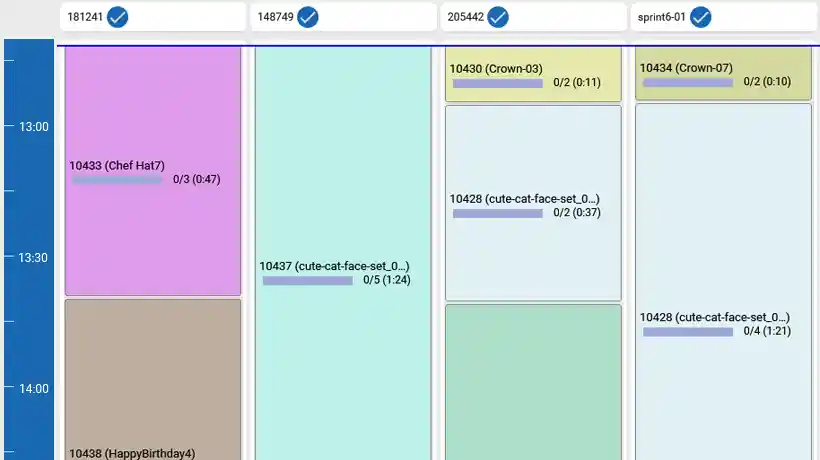
ZSK TERMINAL: planning overview showing multiple machines, their status and remaining times

Three questions determine your setup.

1

Is your machine connected to the network?

You can work without a network – by carrying a USB stick to the machine. Once connected, the machine reports its actual progress. The ZSK PoolBox and ZSK AirBroidery make this possible.

2

How many workstations need to see the same information?

The PoolBox comes into play as soon as more than one workstation is involved, or you want to display the planning overview on screens in production.

3

How large is your machine fleet?

Five active machines are included in planning. Two add-on packages extend the ProductionPlanner beyond that.

Only you know the answers. With that information, a short conversation is all we need to work out which edition suits your business.

Your options with ZSK

How it all fits together.

The products complement each other by task, not in a set sequence. What you need depends on what you want to do.

TERMINAL

Accept, check and prepare files, calculate costs and send designs to the machine. The entry-level edition has no time limit.

PoolBox and AirBroidery

Connect your machines to the network – by cable via the ZSK PoolBox or wirelessly via the ZSK AirBroidery. This connection enables the machine to report its progress.

EPCwin and BasePac

Digitise your own designs. TERMINAL works with finished embroidery files; digitising is done in EPCwin or BasePac.

MY.ZSK

Machine data, service and spare parts in one place.

Explore MY.ZSK
The four editions

Which edition suits you?

The editions build on each other – each includes everything in the edition below it. All prices are listed on this page. The paid editions can be cancelled monthly and include a 30-day trial. The table below shows what is included in each edition.

Free

free of charge

For every ZSK embroidery machine: manage designs, send them to the machine and receive new T8 software versions.

No time limit

Download Free

Studio

€49 / month

When you want to know before setup whether the design fits the hoop, whether the thread colours are right and how much the embroidery will cost.

30-day trial with your files

Factory

€129 / month

When you need to know which job is running on which machine, and which machine will be available next.

30-day trial with your files

Technology

€199 / month

For technical embroidery – TFP, smart textiles and composites.

30-day trial with your files

Have a larger machine fleet? Add-on packages extend your planning capacity: ProductionPlanner Pro adds 20 machines for €500 per month, Enterprise adds 50 machines for €1,000 per month.

What is included in each edition

Each module is included from the edition shown onwards.

Module Included from What it does
ConverterFreeReads and converts embroidery files, with a design preview.
DesignStockFreeDesign management with categories, search, date filters, thumbnails, and label and job sheet printing.
EasyTextFreeLettering from installed fonts, positioned within the hoop or at a set distance from a design.
PhotoStitchFreePhotos converted into embroidery, with up to 24 colours and traced outlines.
HoopsStudioHoop management with dimensions, a hoop preview and checks to see whether the design fits.
AnalyzerStudioCosting based on the finished embroidery file using your own rates, with quotations as XLSX or PDF files.
AdvancedImportStudio37 additional import formats beyond those included free of charge.
AdvancedExportStudioExport to DST and PES in addition to .z00; start and end point settings on export, with markers in the preview and on the job sheet.
ConverterPlusStudioEnhanced preview with grid, scale, coordinates, paths, trims and thread rendering, plus batch conversion of entire folders.
AdvancedColorMatchingStudioAutomatic colour matching using LAB colour distance or a cross-reference table; also includes thread catalogue selection in PhotoStitch.
ProjectsFactoryGroups all files for a job into a project, with comments for each file.
MachineMatchingFactoryA queue for each machine, file checks on import, barcode assignment and head selection for parts produced in parallel.
MaintenanceFactoryMaintenance intervals, scheduled dates, signed records, retrospective entries and export as XLSX, CSV or JSON.
PoolBoxConnectFactoryLive connection to the PoolBox server: the same up-to-date information at every workstation, with feedback from the machine.
ProductionPlannerFactoryPlanning across your machine fleet, automatic assignment by capacity, hoop type and thread cones, a planning overview with remaining times, and shifts.
Good to know

What else matters in everyday use.

Offline

The licence is activated online and renewed in the background. After that, you do not need an internet connection to work. Activation via a licence file is available for isolated production networks.

Multilingual

The interface is available in 17 languages, with right-to-left layouts for Arabic and Hebrew. You can switch languages while working, without restarting. On a panel PC on the production floor, TERMINAL supports touch operation.

Included from the Free edition onwards

Frequently asked questions

Questions you may have before downloading

What is ZSK TERMINAL?

ZSK TERMINAL is production software from ZSK, the embroidery machine manufacturer based in Krefeld, Germany. It opens and checks embroidery files, calculates job costs, plans production and sends designs to ZSK embroidery machines. Digitising is done in EPCwin or BasePac; TERMINAL works with finished embroidery files.

Can TERMINAL convert PES to DST?

Yes, with the Studio edition. TERMINAL can read PES files from the Free edition onwards; export to DST and PES is part of the AdvancedExport module and is therefore included in Studio. TERMINAL reads 43 embroidery file formats in total; six of these – TC/Z00, DST, DSZ, PES, TBF and PAT – are included at no extra cost. Studio adds the remaining 37, along with batch conversion of entire folders.

Does TERMINAL also work with embroidery machines from other manufacturers?

For files, yes; for machine connectivity, no. TERMINAL opens and converts embroidery files regardless of the machine manufacturer and exports them as DST or PES. Network transfer, production feedback and firmware notifications are designed for ZSK embroidery machines.

How much does ZSK TERMINAL cost?

The Free edition is free of charge with no time limit; all you need is a one-off registration in the ZSK License Hub. Studio costs €49 per month, Factory €129 and Technology €199. All three offer a 30-day trial. To plan for more than five machines, you can extend the ProductionPlanner by 20 machines for €500 per month or by 50 machines for €1,000 per month.

Do I need an internet connection to use TERMINAL?

Not for day-to-day work. The licence is activated online once and renewed in the background; activation via a licence file is available for isolated production networks. TERMINAL needs a connection to check for new software versions and updates to the T8 control unit software.

What is the difference between TERMINAL and EPCwin?

EPCwin and BasePac are digitising programs: they turn artwork into embroidery designs. TERMINAL works with finished embroidery files – opening, checking and preparing them, calculating costs, planning production and sending designs to the machine. The only exceptions are lettering and photographic designs, which TERMINAL can create itself.

How many machines can I plan for with TERMINAL?

The Factory edition includes planning for five active machines. Two add-on packages extend the ProductionPlanner beyond that: Pro adds 20 machines and Enterprise adds 50.

Can I digitise designs with TERMINAL?

No – EPCwin and BasePac are available for that. However, TERMINAL can create lettering from installed fonts and photographic designs with up to 24 colours.

As of September 2026 · ZSK Stickmaschinen GmbH, Krefeld

Download

How to get the software.

Download it and start working with your own files straight away.

Get started straight away

Enter your email address in the ZSK License Hub – your download link and licence key will be sent by email. The free features remain available with no time limit.

One-off registrationNo time limit
Download Free

Try it with your own files

Thirty days with the full range of features. To start the trial, add a payment method in the License Hub. Locked features remain visible afterwards; clicking them shows which edition is required.

Payment method required€49 / month afterwards
Try Studio for 30 days

Prefer a demo using your own files?

Bring along a design that you currently cannot open, or can only open with a workaround, together with a typical job costing. We demonstrate TERMINAL using your files, not a sample project.

Request a demo with your files
Überblick

Die Software am Arbeitsplatz der Stickerei.

Das Terminal arbeitet mit fertigen Stickdateien – eigenen und fremden – und mit dem, was der Betrieb daraus machen muss.

Ein Auftrag durchläuft immer dieselbe Kette: Er kommt herein, wird gelesen und geprüft, aufbereitet und gerechnet, verwaltet, geplant und an die Maschine gesendet. Das Terminal begleitet ihn auf diesem ganzen Weg.

Es ist kein Punchprogramm. Muster werden damit nicht von Grund auf digitalisiert; dafür stehen EPCwin und BasePac. Die Ausnahme sind Schriftzüge und Fotomotive – die erzeugt das Terminal selbst.

Welche Stufe zu Ihnen passt, entscheidet sich meist daran, ob Sie an ein oder zwei Maschinen arbeiten oder mehrere koordinieren müssen.

Bild-Platzhalter Der Weg eines Auftrags durch das Terminal · terminal-kette.svg
Eingang · Lesen · Prüfen · Aufbereiten · Rechnen · Verwalten · Planen · Senden · Begleiten
Ein bis zwei Maschinen

Die Arbeit steckt in der Datei.

Ein Auftraggeber schickt ein Format, das Sie nicht lesen. Sie prüfen im Kopf, ob das Muster in den Rahmen passt, ordnen Kone für Kone zu und rechnen den Preis aus Erfahrung. Fällt etwas auf, dann an der Maschine.

0 €Free

Dauerhaft nutzbar, kein Testzeitraum

Es genügt eine einmalige Registrierung. Eine ZSK-Maschine versorgen Sie damit ohne Zukauf mit Mustern.

  • Die gängigen Formate lesen und konvertieren: TC/Z00, DST, DSZ, PES, TBF und PAT
  • Musterverwaltung mit Kategorien, Suche, Zeitfilter und Vorschaubildern – auch wer ein Muster nicht angelegt hat, findet es wieder
  • Schriftzüge aus den installierten Schriften: Eine Namensbeschriftung wird zur Eingabe statt zum Auftrag
  • Fotomotive als Stickerei, bis zu 24 Farben, mit nachgezeichneten Konturen
  • Etikett und Auftragszettel drucken
  • Maschinenpark einmal abbilden – Zuordnung, Planung und Farbabgleich setzen darauf auf
49 €/ Monat · Studio

Wenn fremde Dateien hereinkommen

Die Stufe für die Musteraufbereitung – und für alle, die ihre Preise begründen müssen.

  • 43 Formate statt sechs, ganze Ordner in einem Durchgang, Rückgabe nach DST und PES
  • Vorschau mit Wegen für Sprünge, Schnitte und Farbwechsel entlang des tatsächlichen Nadelwegs
  • Rahmenverwaltung mit Maßen: vor dem Rüsten sehen, ob das Muster hineinpasst
  • Start- und Endpunkt selbst festlegen, auch bei der Stapelkonvertierung
  • Farben automatisch den Konen zuordnen – über den LAB-Farbabstand oder Ihre eigene Crosstabelle
  • Kalkulation aus der fertigen Stickdatei mit Ihren eigenen Sätzen, Angebot als PDF oder XLSX
Bild-Platzhalter Converter-Vorschau eines Fremdmusters · converter-vorschau.png
Sprünge, Schnitte und Farbwechsel als Wege, ein langer Schnitt hervorgehoben

Beide Stufen laden Sie sich selbst herunter. Free ist sofort und dauerhaft nutzbar, Studio können Sie 30 Tage testen.

Eine Frage vorab? software____________@zsk.de · +49 2151 444-0

Mehrere Maschinen · Schichtbetrieb · mehrere Arbeitsplätze

Die Arbeit steckt in der Verteilung.

Was wann auf welcher Maschine läuft, weiß eine Person. Fällt eine Maschine aus, kann niemand sonst sagen, was das für Ihre Zusagen bedeutet. Zwei Arbeitsplätze haben zwei Wahrheiten, und ob eine Wartung stattgefunden hat, lässt sich im Zweifel nicht zeigen.

Factory

Produktionsplanung über den Maschinenpark, Warteschlange je Maschine, Wartungsprotokoll mit Unterzeichnern, Projekte mit allen Auftragsdateien und der gemeinsame Stand über alle Arbeitsplätze.

Technology

Die Stufe für die technische Stickerei. Im Modulumfang entspricht sie heute Factory; Funktionen für technische Anwendungen kommen in den kommenden Versionen in dieser Stufe hinzu.

Bild-Platzhalter Planungsübersicht mit mehreren Maschinen · planungsuebersicht.png

Drei Fragen entscheiden, wie Ihr Aufbau aussieht.

1

Wie sind Ihre Maschinen erreichbar?

Über ein Verzeichnis, über den PoolBox-Server von ZSK oder über den AirBroidery-Stick, der eine Maschine ohne Serverinfrastruktur ins Netz bringt. Die Antwort entscheidet, welche Hardware dazugehört.

2

Wie viele Arbeitsplätze sollen denselben Stand sehen?

Sobald mehr als einer mitarbeitet oder die Planungsübersicht auf Bildschirmen in der Produktion hängen soll, kommt die PoolBox ins Spiel.

3

Wie groß ist Ihr Maschinenpark?

Fünf aktive Maschinen sind in der Planung enthalten. Darüber erweitern zwei Zusatzpakete den ProductionPlanner.

Im GesprächDiese drei Fragen lassen sich nicht auf einer Webseite beantworten, weil die Antwort von Ihrem Betrieb abhängt. Bringen Sie sie mit – Preis und Umfang stehen dann im Angebot.
Module

Was in welcher Stufe steckt.

Zum Abgleich mit Ihrem Angebot. Die genannte Stufe ist die, ab der ein Modul enthalten ist – jede Stufe enthält alles aus der Stufe darunter. Einzelne Module werden nicht gesondert abgegeben.

Modul ab Stufe Was es leistet
Converter Free Liest und konvertiert Stickdateien, mit Vorschau des Musters.
DesignStock Free Musterverwaltung mit Kategorien, Suche, Zeitfilter, Vorschaubildern, Etikett- und Auftragszetteldruck.
EasyText Free Schriftzüge aus installierten Schriften, im Rahmen oder mit Abstand zu einem Muster platziert.
PhotoStitch Free Fotomotive als Stickerei, bis zu 24 Farben, nachgezeichnete Konturen.
Hoops Studio Rahmenverwaltung mit Maßen, Rahmenvorschau, Prüfung, ob das Muster hineinpasst.
Analyzer Studio Kalkulation aus der fertigen Stickdatei mit eigenen Sätzen, Angebotsdokument als XLSX oder PDF.
AdvancedImport Studio Die 37 zusätzlichen Importformate über den freien Umfang hinaus.
AdvancedExport Studio Export nach DST und PES neben .z00; Start-/Endpunkt-Vorgabe beim Export und die Marker auf Vorschau und Auftragszettel.
ConverterPlus Studio Die überarbeitete Vorschau – Raster, Maßstab, Koordinaten, Wege und Schnitte, Fadendarstellung – und die Stapelkonvertierung ganzer Ordner.
AdvancedColorMatching Studio Automatischer Farbabgleich über LAB-Farbabstand oder Crosstabelle; auch die Garnkatalog-Auswahl in PhotoStitch.
MultiMachineSend Studio Ein Muster in einem Schritt an mehrere Maschinen, mit eigener Dateinummer oder gemeinsamem Namen.
Projects Factory Bündelt alle Dateien eines Auftrags zu einem Projekt, mit Kommentaren je Datei.
MachineMatching Factory Warteschlange je Maschine, Dateiprüfung beim Einlesen, Barcode-Zuordnung, Kopfauswahl für parallele Teile.
Maintenance Factory Wartungsintervalle, Termine, Protokoll mit Unterzeichnern, nachträgliche Einträge, Export als XLSX, CSV oder JSON.
PoolBoxConnect Factory Live-Anbindung an den PoolBox-Server: gemeinsamer Stand über alle Arbeitsplätze, Rückmeldung von der Maschine.
ProductionPlanner Factory Planung über den Maschinenpark, automatische Zuordnung nach Kapazität, Rahmentyp und Konen, Planungsübersicht mit Restzeiten, Schichten.
Download

So kommen Sie an die Software.

Kein Formular, kein Servicetermin. Sie laden herunter und legen los.

Free herunterladen

E-Mail-Adresse im ZSK License Hub angeben – Download-Link und Lizenzschlüssel kommen per Nachricht. Der kostenfreie Umfang ist dauerhaft nutzbar.

Einmalige RegistrierungDauerhaft kostenfrei
Zum License Hub →

Studio 30 Tage testen

Gesperrte Funktionen sind übrigens sichtbar und nennen beim Anklicken die Stufe, die sie voraussetzt – Sie sehen von Anfang an, was eine höhere Stufe kann.

30 Tage49 € / Monat danach
Testzugang holen →

Lieber am eigenen Material?

Bringen Sie zu einem Termin ein Muster mit, das Sie heute nicht oder nur mit Umweg öffnen, und eine typische Auftragskalkulation. Wir zeigen es an Ihren Dateien, nicht an einem Demobeispiel.

Termin vereinbaren